Step 1
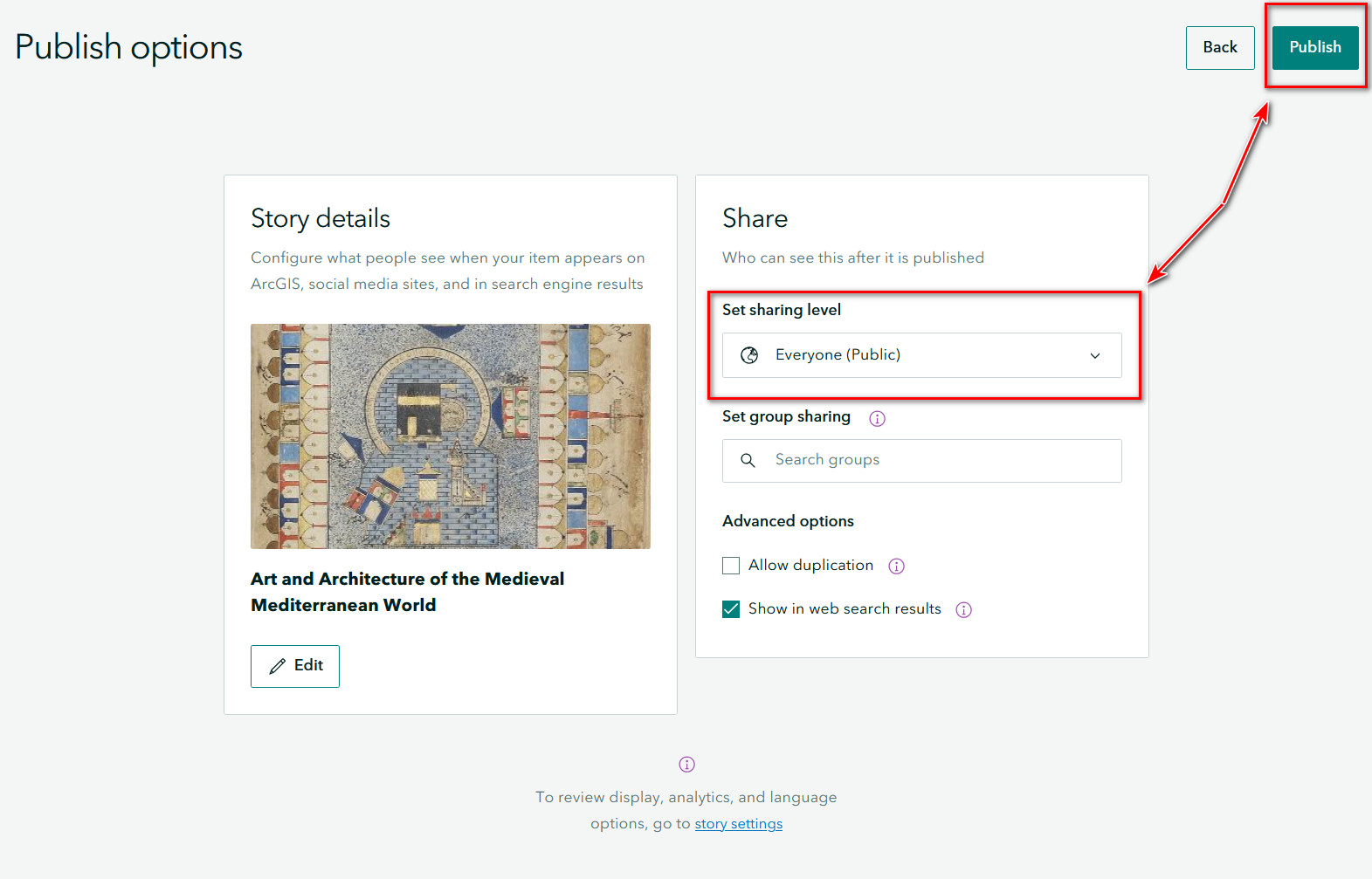
Select the Publish button along the top ribbon in the StoryMaps builder.

Step 2
Set Sharing Level
The default sharing setting for StoryMaps is Private, meaning that your StoryMap is only visible to you.
You can update your sharing settings to share with a wider audience:
- Organization: Your StoryMap will be visible to anyone at Northwestern University. Viewers will need to sign into their Northwestern ArcGIS Online account to view your StoryMap.
- Everyone (Public): Your story map is visible to everyone.
- Group Sharing: Share content with members of an ArcGIS Online group. You can provide read-only access to your StoryMap or editing access if you are a member of a shared update group.
Updated Story Card
On the Publishing screen, you can update your story card by adding a thumbnail image, title, and description. I suggest adding this information when you publish.
Advanced Publishing Options
If you want others to copy your StoryMap, choose the allow duplication option. This lets users save and edit their own copy, but their changes will not affect your original StoryMap.
To make your StoryMap easier to find, you can choose to show it in web search results. You can enable or disable this option as needed.